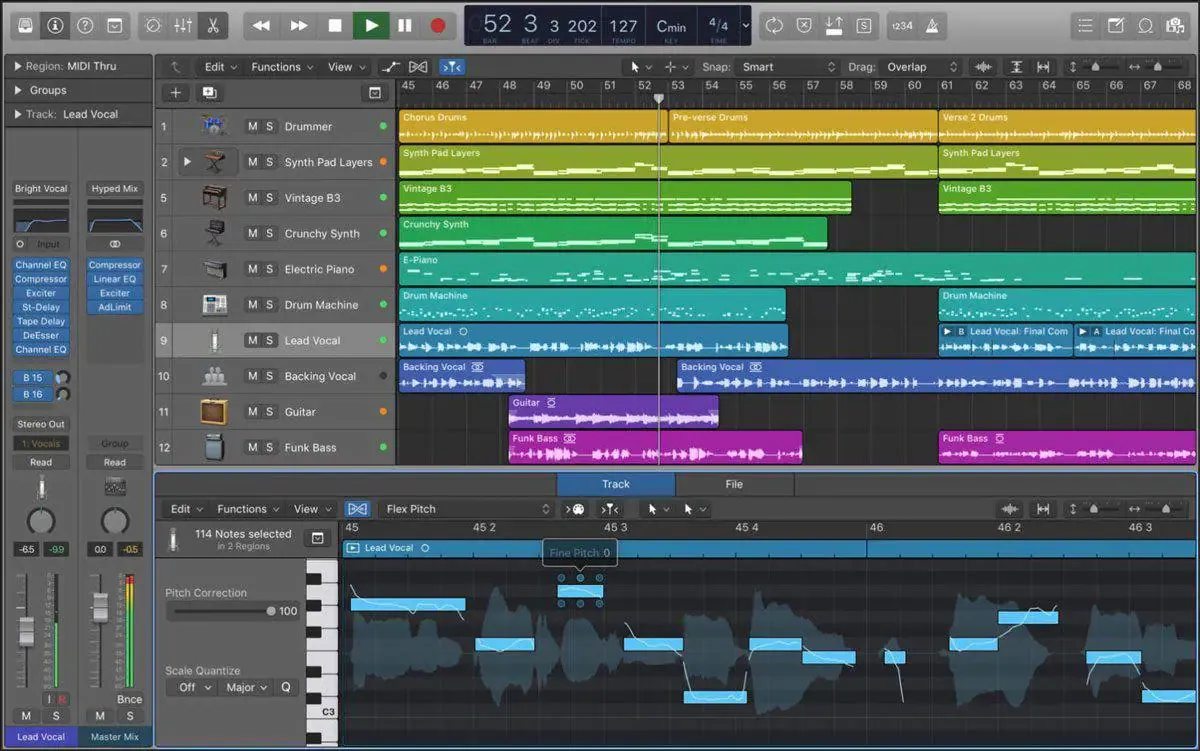
inRadium, your personal "player" — no barriers , just 2 steps, stunning results

Record the section where you want to add instruments in inRadium, freely create eight instruments with one click — like a pro player performing for you — then drag the track into your DAW and finish a perfect piece with ease.

#

Arranging has never been this easy

Powerful generative AI plugin
The strongest stem instrument generation

inRadium integrates deeply with major DAWs. Record an arrangement or instrument, click once, and it intelligently generates performance tracks for the other instruments you want — many styles, customizable, with pro-player-level sound.

Real-time AI generation

Record more than 20 seconds of reference audio, pick an instrument and style, and instantly generate two high-quality performances, auto-aligned.

Full User Guide →

Compatible with older devices

No latest hardware needed — it runs smoothly from macOS 10.13, so you can still enjoy the endless possibilities AI brings to music.

Download Latest →

One-click into your DAW

Pick the performance you like and drag it straight into your DAW project, or save it as a file to play anywhere.

View Blog →
#

Two simple steps: record reference audio & create a performance

Eight instruments
Dozens of music styles

Record a clip in your DAW where you want to add an instrument, choose one of guitar, piano, drums, bass, strings or synth, freely mixed with 25 music styles, and inRadium delivers an exquisite performance with timeline alignment — the whole flow takes under 5 minutes, completely changing how you arrange.

Create fast

Generate styled stems
in just minutes

HD rebuild

Not happy with the quality?
Rebuild HD audio instantly

#
#

Why choose inRadium?

Effortless arrangement for every creator

Whether you're a songwriter, producer or video creator, inRadium helps you finish a full arrangement or rework music in no time. Zero learning curve, yet it lifts your work to the next level.

Watch the demo
Take your music to new heights

#

Subscription plans

Choose the plan that fits you

Subscribe monthly, cancel anytime.
Yearly is cheaper — see the pricing page. Credits are used for AI performance generation and processing.

Basic

A great starter to lightly experience the magic of AI arrangement.

$5/mo

Start free now

Cancel anytime

  • 250 credits / mo (25 uses)
  • 4 instruments included
  • Up to 2 parts (45s each)
  • Standard-quality performance

Pro

The top pick for frequent creators — multiplied credits keep up with a high-output pace.

$10/mo

Subscribe now

Cancel anytime

  • 500 credits / mo (50 uses)
  • 6 instruments included
  • Up to 5 parts (90s each)
  • Standard-quality performance

Max

Unlock all AI capabilities, including AI HD stem separation.

$30/mo

Subscribe now

Cancel anytime

  • 2000 credits / mo (200 uses)
  • All 8 instruments
  • Up to 20 parts (360s each)
  • Upgrade to HD quality

User stats

Thousands of creators already use it

The figures below come from real user feedback and platform stats.

100 %

Satisfaction

12K

Active users

15 k+

Plugin downloads

Testimonials

Hear what they say

Real experiences shared by music creators worldwide.

Arranging a song used to mean hiring players or spending days moving MIDI by hand. With inRadium I get a full demo in 20 minutes — more than 10× faster.

#

Tristan Holloway
Independent Music Producer

Clean interface and a super-simple flow. I play some piano, pick the other instruments, and two performance versions come out at once — and it nails what I want on the first try. Amazing.

#

Sarah LinSongwriter

I make videos and don't know music theory, but I need original background music. inRadium lets me arrange it myself — no more copyright worries.

#

Dorian Blackwood
Content Creator

The AI HD performance is unexpectedly good. I often have it play guitar solos — genuinely stunning, and they drop straight into a mix with no problem.

#

Gideon Ashcroft
Recording Engineer

With inRadium, arrangement is no longer my bottleneck. When inspiration strikes, I land a full demo in minutes.

#

Iris ChenOriginal Musician

News & updates

Latest content

On AI music, DAW tips, and inRadium creation guides.

The Age of AI Arrangement: How inRadium Changes Your Workflow
Music Production

The Age of AI Arrangement: How inRadium Changes Your Workflow

How AI arrangement removes the old barriers — record a phrase, pick an instrument, and get a take that plays in time with your music.

Read More
From Recording to Stems: A Full Arrangement in 5 Minutes
User Guides

From Recording to Stems: A Full Arrangement in 5 Minutes

A step-by-step walkthrough of the complete inRadium flow — from setting up a reference to dragging a finished part into your DAW.

Read More
8 Instruments × 25 Styles: The Pairing Guide
Creation Tips

8 Instruments × 25 Styles: The Pairing Guide

What each of inRadium's 8 instruments is for, how to let style set the mood, and prompt recipes that raise your hit-rate.

Read More
#

Ready to start your first track?